My coworker Stoyan Stefanov wrote a helpful blog post a few weeks ago describing how to create a simple TextMate bundle that allows you to quickly run the current file through JSLint. I’ve extended Stoyan’s bundle command to prettify the JSLint output for display in an HTML window.
Here’s what the ouput looks like (click for full size):
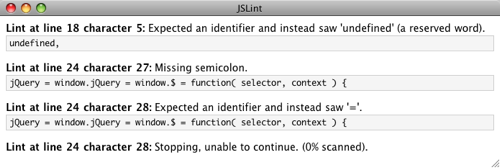
To use this command, just follow the instructions in Stoyan’s blog post using the script below in place of his bundle command, then select “Show as HTML” from the Output dropdown below the command edit box.
#!/usr/bin/env ruby require 'cgi'lint = `java org.mozilla.javascript.tools.shell.Main ~/Library/JSLint/jslint.js "$TM_FILEPATH"`lint.gsub!(/^(Lint at line )(\d+)(.+?:)(.+?)\n(?:(.+?)\n\n)?/m) do "<p><strong>#{CGI.escapeHTML($1)}<a href=\"txmt://open?url=file://TM_FILEPATH&line=#{CGI.escapeHTML($2)}\">#{CGI.escapeHTML($2)}</a>#{CGI.escapeHTML($3)}</strong>#{CGI.escapeHTML($4)}" << ($5 ? "<pre>#{CGI.escapeHTML($5)}</pre>" : '') endlint.gsub!(/^(jslint:)(.+?)$/, '<p><strong>\1</strong>\2</p>') lint.gsub!(/TM_FILEPATH/, ENV['TM_FILEPATH'])print <<HTML <!doctype> <html> <head> <style type="text/css"> p { margin-bottom: 0; } pre { background: #f5f5f5; border: 1px solid #cfcfcf; font-size: 12px; margin-top: 2px; padding: 2px 4px; } </style> </head> <body> #{lint} </body> </html> HTML
Update (2009-05-07): Added line number linkage courtesy of Steve Spencer.

Comments
Awesome
as awesome as it gets :)
Javascript Tools Bundle
There’s a javascript tools textmate bundle that does this already (sorry to say if you didn’t already know). It also gives items for doing compression on your JS files from within TM.
I don’t know where the official latest version of the bundle is, but this should help you find it:
http://www.google.com/search?q =javascript+tools+textmate+bun dle
javascript lint vs. jslint
@J5
the javascript tools bundle uses javascript lint, not jslint. they are not the same
Hyperlink back into TextMate
If you replace the “gsub!” lines with the following, each line number will be hyperlinked back into TextMate.
Using Safari's JSC rather than Rhino
If you change
to
You will be using Safari’s built in JavaScript interpreter and won’t need to install Rhino. (One less external dependency!)
JSC Version of JSLint
Forgot to provide the link to making a jsc version of JSLint:
Running JSLint with Safari’s JavaScript Core
Re: Using Safari's JSC rather than Rhino
Very cool. I didn’t even know this existed. Thanks David.
jslint4java
I know others have suggested jsc (which works well), but you may also be interested in jslint4java. It bundles rhino and jslint into a single executable jar. I find it quite convenient (as the author).
http://code.google.com/p/jslin t4java/
Re: Pretty JSLint output for TextMate
Great stuff Ryan.
If you pass “$TM_SELECTED_TEXT” to jslint, it’ll operate on the current state of the file, not the last saved version of it. Since input is set to ‘Entire Document’ that would be the selected text. Makes it easier to find errors and correct without having to save every time (sometimes across a slow ssh-share).
incorporated into the TM javascript-tools bundle
I took something like Steve’s html view from above and merged it into subtlegradient’s current bundle which ouputs the textmate themed window. Does require Rhino ATM (as well as jslint in your ~/Library/JSLint), I’ll hack the Safari ‘fix’ in when I have time (Unless someone else does first, let me know)…
www.github.com/robrobbins/http ://github.com/robrobbins/javas cript-tools.tmbundle
adapted to node.js with node-jslint
Hi there,
Just adapted this tutorial for use with node-jslint, fczuardi‘s fork of reid’s wrapper for Crockford’s jslint for node.js
(Textmate action bundle is in the extras directory in the repo)
Thx again for this tutorial :)
Updated Version
Here’s an updated version that suppresses the output if no errors/warnings were found. This allows you to map the command to ⌘S without JsLint getting in your way. It uses the official node-jslint version and comes with a new look and feel.
No Rhino or JavaScriptCore necessary
It’s not actually necessary to run JSLint through Rhino or JavaScriptCore. Since TextMate allows you to build a command that displays HTML, you can include JSLint using a script tag. I’ve built a bundle to demonstrate what’s possible with this method: http://github.com/voxwerk/JSLi nt.tmbundle
Just download the bundle and either double-click the bundle or place it in “~/Library/Application\ Support/TextMate/Bundles/”, then just open a JavaScript file and press ⌃⇧V.